

When a device is retired, its data has to go. The two ways to make that happen, erasing the storage or physically destroying it, both remove the risk. Only one of them leaves you with a device that still has value.
For years, shredding drives was treated as the safest option by default. Modern erasure standards and verified software have changed that calculation for most business devices. This guide compares data erasure and data destruction, explains when each is the right choice, and sets out what a data destruction certificate should contain so your records hold up to audit.
Data Erasure and Data Destruction Defined
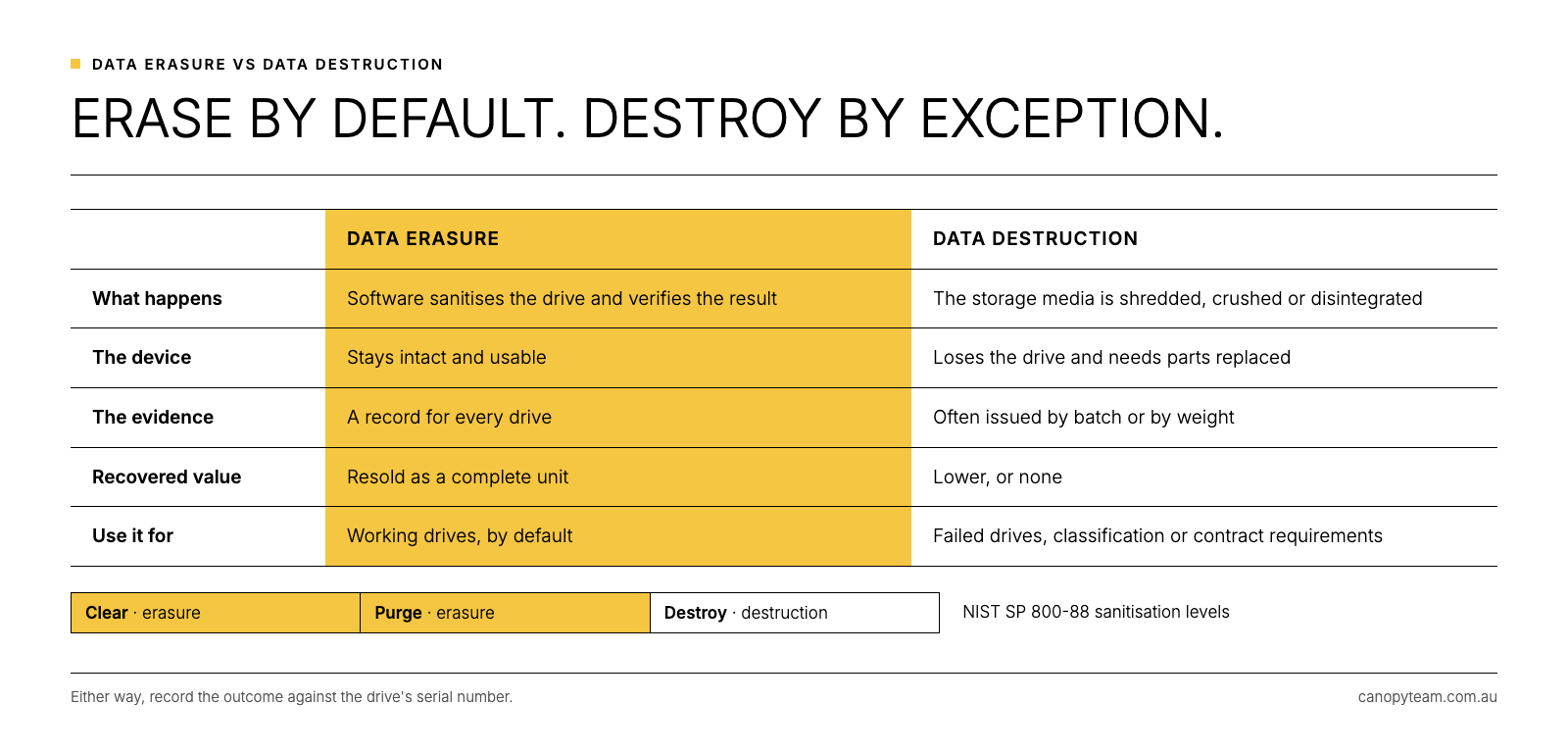
Data erasure uses software to sanitise a storage device so its data cannot be recovered, then verifies the result. The device and its drive stay intact and can be reused or resold.
Data destruction physically destroys the storage media, usually by shredding, crushing or disintegrating it. The data is gone because the media is gone, along with any value the component had.
The NIST media sanitisation guideline, updated as SP 800-88 Revision 2 in September 2025, groups sanitisation into three levels: clear, purge and destroy. Clear and purge are forms of erasure that protect against progressively more capable recovery attempts, while destroy leaves the media unusable. The revision also places more weight on organisations running a documented sanitisation program rather than making one-off decisions device by device.
Why Secure Data Erasure Is the Default for Most Devices
For the laptops, phones and tablets most organisations retire, verified erasure delivers the same practical outcome for data security as destruction while keeping the device usable. That matters for three reasons:
- Recovered value: a laptop with a working, erased drive can be resold as a complete unit, while one with a shredded drive sells for less and needs parts replaced.
- Reuse: erased devices can be redeployed internally or passed to a new owner, extending their working life.
- Evidence: erasure software produces a record for every drive, whereas shredding records are often issued by batch or by weight.
Physical destruction also sends material to recycling earlier than necessary. For organisations reporting on their environmental footprint, erasure followed by reuse is the stronger outcome.
When Physical Destruction Is the Right Call
There are still good reasons to destroy media:
- Failed drives that erasure software cannot access.
- Policy or classification requirements, such as the Australian Signals Directorate's ISM guidelines for media for certain government-classified information.
- Contractual obligations with clients that specify destruction.
- Devices at the end of their usable life, where there is no resale value left to protect.
In each case, the destruction should still be recorded against the drive's serial number, with the method and date noted.
What a Data Destruction Certificate Should Show
Whether a device is erased or destroyed, the certificate is what proves it happened. Under Australian Privacy Principle 11, organisations must take reasonable steps to destroy or de-identify personal information they no longer need, and records are how you show those steps were taken.
A useful data destruction certificate includes:
- the device serial number and asset tag
- the make, model and storage details
- the method and standard used
- the date and time of the process
- the result of verification
- the operator or system that performed it
- a tamper-evident signature or unique identifier.
Blancco, one of the most widely used erasure platforms, explains how its certificates are made tamper-proof through digital signatures that change if the report is edited. Batch certificates that list only a weight or a count of drives are much weaker evidence, because they cannot link a specific device to a specific outcome.
What Blancco Is and Why It Appears in ITAD Contracts
Blancco is data erasure software used by ITAD providers, IT teams and device manufacturers to sanitise drives and mobile devices, verify the result and produce certificates. It is often named in procurement requirements because its methods are independently tested and its reports are widely accepted by auditors.
Canopy has been a Blancco Gold Partner since 2024. Working drives that come through Canopy's Recover service are erased to NIST 800-88 standards, with an individual certificate issued for each unit. Our guide on how to wipe a laptop for business explains why this matters more than a factory reset.
Frequently Asked Questions
Is data erasure as secure as shredding?
For working drives, verified erasure to a recognised standard such as NIST SP 800-88 leaves data unrecoverable while keeping the device usable. Physical destruction is best reserved for failed drives or where policy or classification requires it.
What is a certificate of data destruction?
It is a record confirming that a specific storage device was erased or destroyed, including its serial number, the method and standard used, the date and the verification result.
Can SSDs be securely erased?
SSDs can be securely erased using the drive's built-in sanitise or cryptographic erase functions, applied by software that verifies the result. Repeated overwriting, designed for spinning hard drives, is not a reliable method for flash storage.
Does degaussing work on laptop drives?
Degaussing only affects magnetic media, so it does not sanitise the solid state drives used in most modern laptops.
Choosing Between Data Erasure and Data Destruction
A simple rule works for most organisations: erase by default and destroy by exception. Write that rule into your IT asset disposal policy, name the standard you require, and list the cases where destruction applies.
Then make sure the rest of the process supports it. Devices need to be collected under chain of custody, tracked by serial number and cleared of management locks before they reach a buyer, steps we cover in our overview of ITAD for Australian businesses and our guide to Activation Lock and MDM lock. The value recovered from erased devices can then offset the cost of the next refresh, as explained in laptop depreciation and real value.
Protect your data and recover the value in your devices.
Use the form on this page to request certified erasure and a recovery quote from the Canopy team.