
Offboarding checklists usually focus on accounts: disable the login, transfer the mailbox, revoke access. The devices tend to get a single line that says "collect laptop", and that is where things go wrong. Hardware comes back late, arrives still locked to the former employee, or never comes back at all.
The problem is sharper for hybrid and remote teams. Device management company Firstbase reported in 2023 that, according to Gartner analysts, some enterprises were getting back at best around 50% of laptops from departing remote workers, and every device that is not returned represents lost value and an open data risk.
This IT offboarding checklist covers the device side of offboarding in three stages, from the moment a departure is confirmed to the point where each device is redeployed, resold or recycled.
Why Device Offboarding Needs Its Own Checklist
Account offboarding mostly happens inside a few admin consoles. Device offboarding involves people in different places, including HR, the employee's manager, IT, sometimes a courier and often an MSP. When no single checklist connects them, tasks fall between teams.
For organisations certified to ISO/IEC 27001, the return of assets control, Annex A 5.11, requires staff to return organisational assets when their employment ends, and auditors will expect records showing it happened. For everyone else, a clear process protects data and keeps devices moving while they still hold value. We looked at what happens when devices sit unprocessed in the hidden cost of doing nothing.
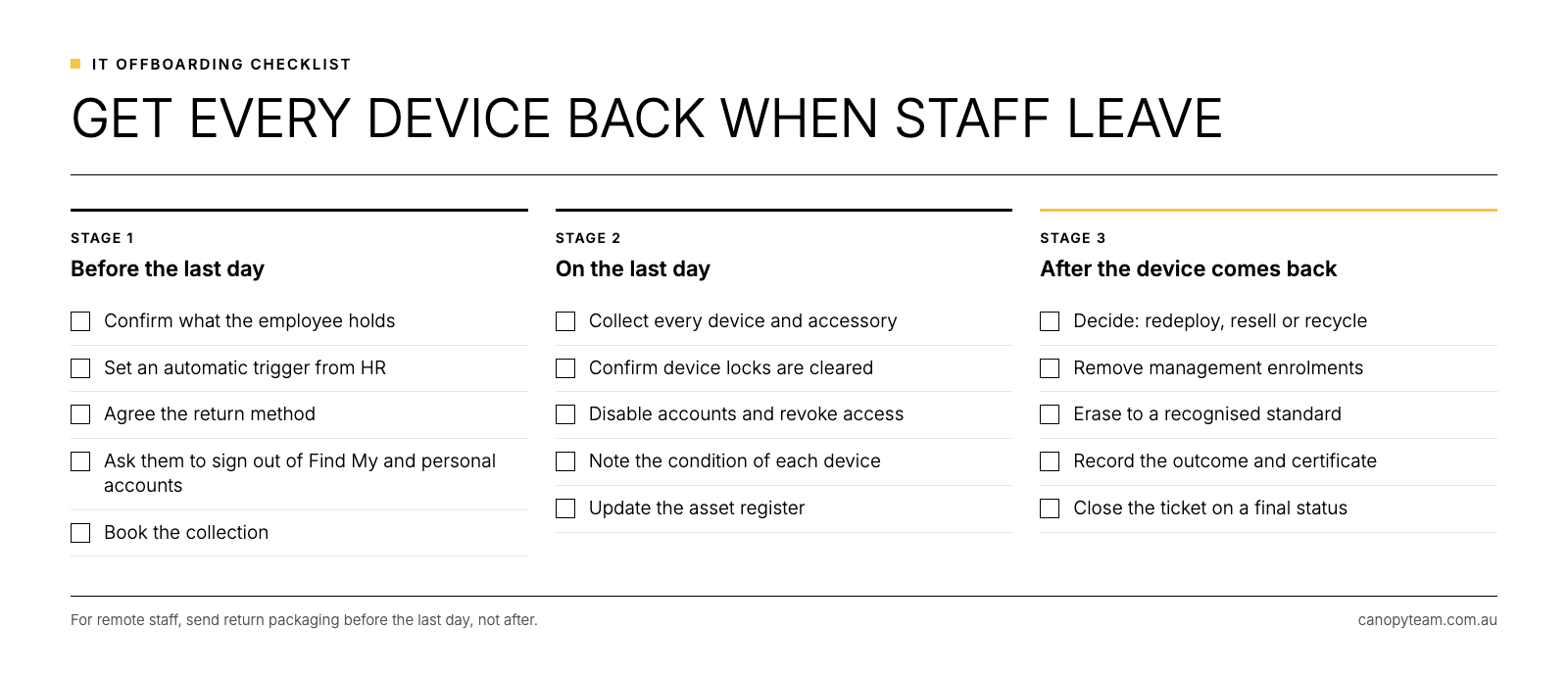
Stage One: Before the Employee's Last Day
Start the device process as soon as a departure is confirmed.
- Confirm what the employee holds. Check the asset register for laptops, phones, tablets, monitors, docks and security keys assigned to them.
- Set an automatic trigger from HR. Make sure IT is notified as soon as a resignation or termination is recorded.
- Agree the return method. Decide whether devices will be handed in on site, collected from home or sent back with prepaid packaging.
- Ask the employee to sign out of personal accounts. Request that they turn off Find My and sign out of their Apple Account or Google account on company devices.
- Book the collection. For remote staff, schedule pickup for the last day or the day after, while the employee is still easy to contact.
Stage Two: On the Last Day
- Collect every device and accessory and check them against the asset list.
- Confirm device locks are cleared. If Activation Lock is still on, a user with the right permissions can turn it off in Apple Business, and our guide to Activation Lock and MDM lock covers Windows and Android devices as well.
- Disable accounts and revoke access in line with your security process.
- Note the condition of each device, including any damage.
- Update the asset register to show the device has been returned and who received it.
Stage Three: After the Device Comes Back
- Decide whether to redeploy, resell or recycle. Check the device's age against your refresh cycle; our guide on how long a laptop should last can help you set the rule.
- Remove management enrolments for devices leaving the business, including deregistering them from Windows Autopilot.
- Erase the data to a recognised standard and keep a per-device certificate. Our guide on how to wipe a laptop for business explains why a factory reset falls short.
- Record the outcome against the asset, including the certificate and any resale value.
- Close the ticket only once the device has a final status.
Handling Remote and Interstate Staff
Remote offboarding is where most devices go missing. A departing employee has little reason to prioritise returning a laptop after their last day, and courier arrangements are often left to them.
A few changes make a real difference. Send return packaging before the last day rather than after it, book collection for a set date and time, and make device return part of the final sign-off with HR. Where possible, use one collection partner across every state so the process and the records are consistent.
The privacy stakes are the same wherever the employee lives. Australian Privacy Principle 11 requires reasonable steps to destroy or de-identify personal information that is no longer needed, and a laptop sitting in a former employee's home is outside your control.
An Offboarding Checklist for MSPs Managing Multiple Clients
Managed service providers run offboarding for many clients, often with different tools and expectations. A standard device offboarding checklist applied across every client reduces technician time and makes it easier to show each client that devices were handled properly. It also creates a steady flow of retired devices that can return value to the client instead of filling a storeroom.
Writing the checklist into each client's IT asset disposal policy turns it from good practice into an agreed standard that survives staff changes on both sides.
Frequently Asked Questions
What should an employee offboarding checklist include for IT?
It should cover account deactivation, access removal, return of every device and accessory, clearing device locks, data erasure, asset register updates and a final record for each device.
How do you get a laptop back from a remote employee?
Send prepaid return packaging before the last day, book a courier collection for a fixed date and time, and make device return part of the final HR sign-off.
What if an employee does not return a company laptop?
Treat it as a potential data exposure. Disable the employee's accounts, use your management platform to lock or wipe the device remotely, and follow your HR and legal process for recovering company property.
Who is responsible for device offboarding?
IT usually owns the process, with HR providing the trigger and managers making sure devices are returned. Where an MSP manages devices, those responsibilities should be written into the service agreement.
Make Device Offboarding Routine
Offboarding works when the device side runs as reliably as the account side. Canopy's Recover service collects retired devices, erases working drives to NIST 800-88 standards with an individual certificate for each unit, and grades each device for resale. When a returned device is ready for its next user, Deploy can stage and configure it for a new starter.
Make device offboarding one less thing to chase.
Use the form on this page to set up device collections for departing staff with the Canopy team.