
A laptop or iPhone can come back from a departing employee in perfect condition and still be close to worthless. The reason is usually invisible until someone tries to set it up: the device is still tied to a personal Apple Account, or it is still assigned to the organisation's management service and insists on enrolling again.
These locks exist for good reasons, because they stop stolen devices being reused and keep company hardware under management. When devices are retired, the same protections block redeployment and resale unless someone clears them first. This guide explains how Activation Lock and MDM lock work, why they matter for recovered value, and how IT teams can release devices properly.
What Activation Lock Is and How It Gets Turned On
Activation Lock is Apple's anti-theft feature for iPhone, iPad, Mac and Apple Vision Pro. It links a device to an account so that, after an erase, nobody else can activate it without that account's credentials or an approved bypass.
According to Apple's deployment guidance on Activation Lock, the feature turns on when Find My is enabled. On organisation-owned devices there are two kinds:
- User-linked Activation Lock: the employee turns on Find My with their personal Apple Account, so the lock is tied to them.
- Organisation-linked Activation Lock: the management service controls the lock and holds a bypass code that can turn it off.
User-linked locks are the ones that cause trouble at offboarding. If the employee has left and cannot be reached, nobody else can reactivate the device unless the organisation steps in through its management tools.
What People Mean by MDM Lock
MDM lock usually describes a device that is still assigned to an organisation's management service. On Apple devices assigned through Apple Business, a reset device shows a Remote Management screen during setup and enrols back into your MDM. Windows devices registered with Windows Autopilot behave in a similar way, presenting your organisation's sign-in during setup, and Android devices can carry enterprise factory reset protection, which controls which accounts can activate a device after a reset.
For your own IT team this is useful, because a lost or reset device finds its way home. For a buyer, a refurbisher or even another business unit, a device in this state cannot be used until the original organisation releases it.
Apple Business Manager Is Now Apple Business
Apple replaced Apple Business Manager with a new platform called Apple Business, available from 14 April 2026. The device management functions that IT teams rely on carried across, including viewing organisation-owned devices, assigning them to a management service and managing Activation Lock.
If your internal documentation still refers to Apple Business Manager, the steps below apply in the new platform under broadly the same names.
How to Clear Activation Lock and MDM Lock Before Devices Leave
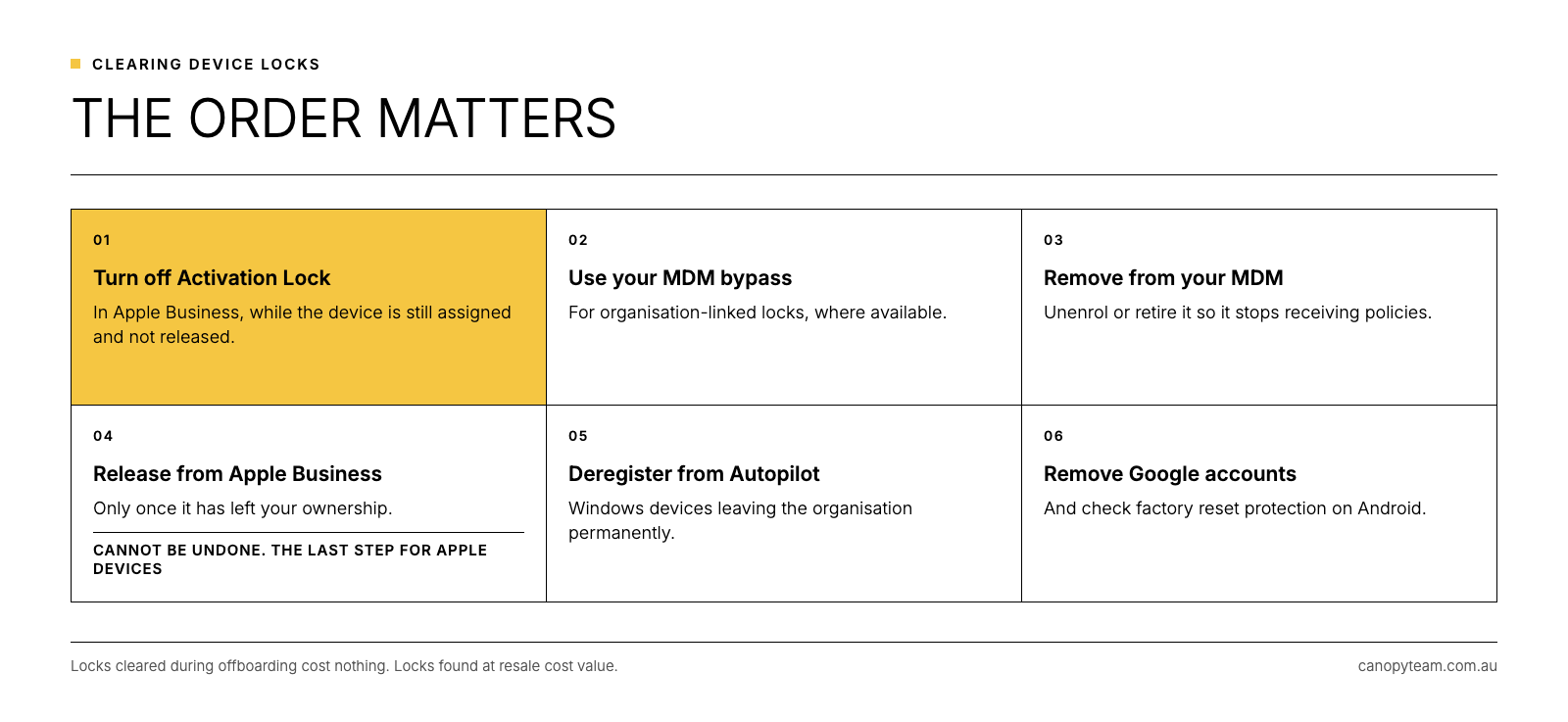
The order matters here, because some steps cannot be undone.
- Turn off Activation Lock first. In Apple Business, a user with the right permissions can turn off Activation Lock on an organisation-owned device, whether the lock is user-linked or organisation-linked. The device must still be in Apple Business and must not have been released.
- Use your MDM bypass where available. For organisation-linked locks, your management service holds a bypass code that can clear the lock remotely.
- Remove the device from your MDM. Unenrol or retire it in your management platform so it stops receiving policies.
- Release the device from Apple Business only once it has left your ownership. Apple's guidance on releasing devices warns that Activation Lock can no longer be managed after release, so this step belongs at the end.
- Deregister Windows devices from Autopilot. Microsoft's Autopilot registration guidance says a device should always be deregistered when it permanently leaves the organisation.
- Remove Google accounts from Android devices and check factory reset protection settings before the device is reset.
Why Device Locks Matter for Recovered Value
A locked device limits every option at the end of its life. It cannot be redeployed to a new starter or sold as a working unit, and in many cases its only remaining value lies in its parts. Resale value depends on a device being fully usable by its next owner, which is why lock status is one of the first things checked when devices are graded.
There is also a time cost. Chasing former employees for passwords, raising support tickets and holding devices in storage while it gets sorted out all erode the value the device had on the day it was returned. Our article on laptop depreciation and real value explains how quickly that value declines.
Frequently Asked Questions
Can Activation Lock be removed without the previous user's password?
For organisation-owned devices in Apple Business, a user with the right permissions can turn off Activation Lock without the employee's credentials. The device must still be in Apple Business and must not have been released.
What does the Remote Management screen mean on an iPhone, iPad or Mac?
It means the device is still assigned to an organisation's management service. That organisation needs to remove the assignment before anyone else can set the device up normally.
How do I remove MDM from an iPad owned by my business?
Turn off Activation Lock in Apple Business, unenrol the iPad in your MDM platform, then release it from Apple Business once it has left your ownership.
Does erasing a device remove Activation Lock?
Activation Lock stays in place after an erase, because it is linked to the device through Apple's activation servers. It needs to be turned off before the device leaves your control.
Build Lock Removal Into Offboarding
The simplest fix is to clear locks during offboarding, while the employee is still reachable and the device is still in your management tools. Adding it as a line item in your IT offboarding checklist means it happens every time rather than whenever someone remembers. It also belongs in your IT asset disposal policy, alongside the standard you use to wipe a laptop before it leaves the business.
When devices come through Canopy's Recover service, each one is graded before resale, and a device free of locks can go back to market as a fully working unit. Clearing locks before collection is one of the easiest ways to increase what your retired fleet returns, and it is a step we cover in our wider guide to ITAD for Australian businesses.
Get more value from the devices you retire.
Use the form on this page to talk to the Canopy team about recovering your next batch of Apple, Windows or Android devices.